PONT Tutorial | Understanding the Space Management Dashboard: A Comprehensive Guide
Welcome to the PONT Space Management Dashboard! This powerful tool serves as your central hub for managing all system activities. Let's explore how it can make your work easier and more efficient.
A Simple Yet Powerful Design
The PONT dashboard stands out for its clean, user-friendly design. We've built it with your needs in mind, focusing on what matters most.
Three Core Goals
Our dashboard follows three key goals to help you work better:
Better Workflow: We help you spend less time in the system and more time on what matters
Task Management: Stay on top of your time-sensitive work without missing a beat
Quick Insights: See important information at a glance to make faster, smarter choices
Unlike some platforms that over engineer their dashboards with unnecessary complexity, Pond's intuitive design keeps things streamlined.
The PONT dashboard brings together everything you need in one place, making your work simpler and more efficient. In the following sections, we'll take a closer look at each feature and how you can make the most of them.
Dashboard Navigation and Structure
65.3
Edit
Dashboard Navigation and Structure
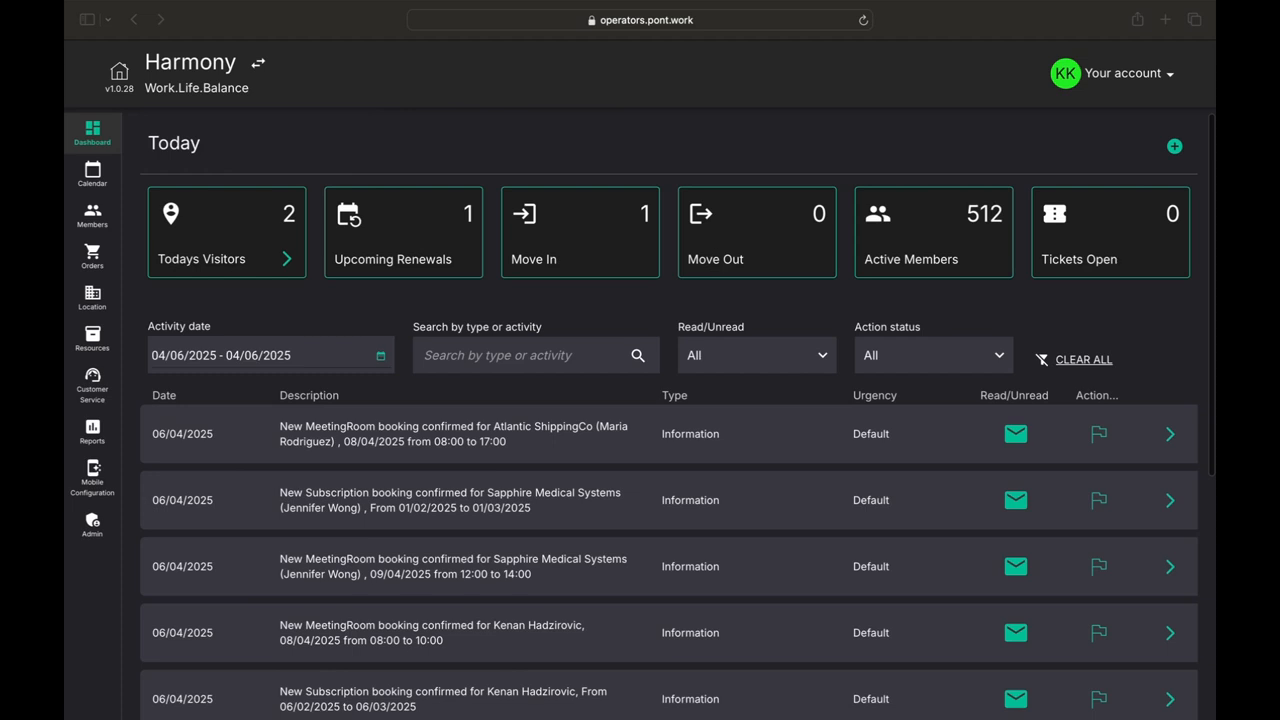
Let's explore how to find your way around the PONT dashboard. We'll look at all the key parts that make it easy to manage your space.
Your Account Hub
In the top right corner, you'll find your personal command center. Here you can:
Update your personal details
Change your password
Get help when you need it
Location Management
Next to your account area, you'll see your location name. If you run multiple spaces, you can:
Switch between different locations using the arrows
Access different spaces with the right admin permissions
Quick Navigation Tools

Along the left hand side, you'll notice the Control Panel. This is where all the tools for running your space live.
The dashboard includes these helpful navigation features:
A Home icon that takes you back to the main screen
The Control Panel with all your essential tools
A central display area for your most important information
The Control Panel
The left sidebar holds your Control Panel - it's like your toolbox for running your space. We'll explore each tool in detail in later sections, but know that everything you need is just a click away.
All these parts work together to give you a smooth, efficient way to manage your space. The clean layout helps you find what you need quickly, so you can focus on what matters most - running your business.
Quick Actions and Efficiency Features
55.6
Edit
Quick Actions and Efficiency Features
Want to save time on your daily tasks? The PONT dashboard makes it easy with its quick actions feature. Let's look at how these tools can speed up your work.
Dashboard Overview
At the top of your screen, you'll see helpful modules that show you:
Upcoming events
Important tasks
Recent alerts
These give you a quick look at what needs your attention.
Quick Actions That Save Time
Pont has introduced quick action capabilities to the dashboard, allowing users to perform their primary responsibilities directly from the home page and complete them in seconds rather than minutes.
Right from your home page, you can:
Add one-off fees to reservations
Create new member accounts
Set up new companies
Handle visitor management
Make new orders
Why Quick Actions Matter
These tools make a big difference in your daily work. Instead of clicking through many screens, you can finish tasks right from the dashboard. This means:
Less time spent on routine tasks
Fewer clicks to get things done
More time for other important work
The quick actions feature turns minutes of work into seconds, helping you manage your space more efficiently.
Dashboard Modules and Detailed Features
56.2
Edit
Dashboard Modules and Detailed Features
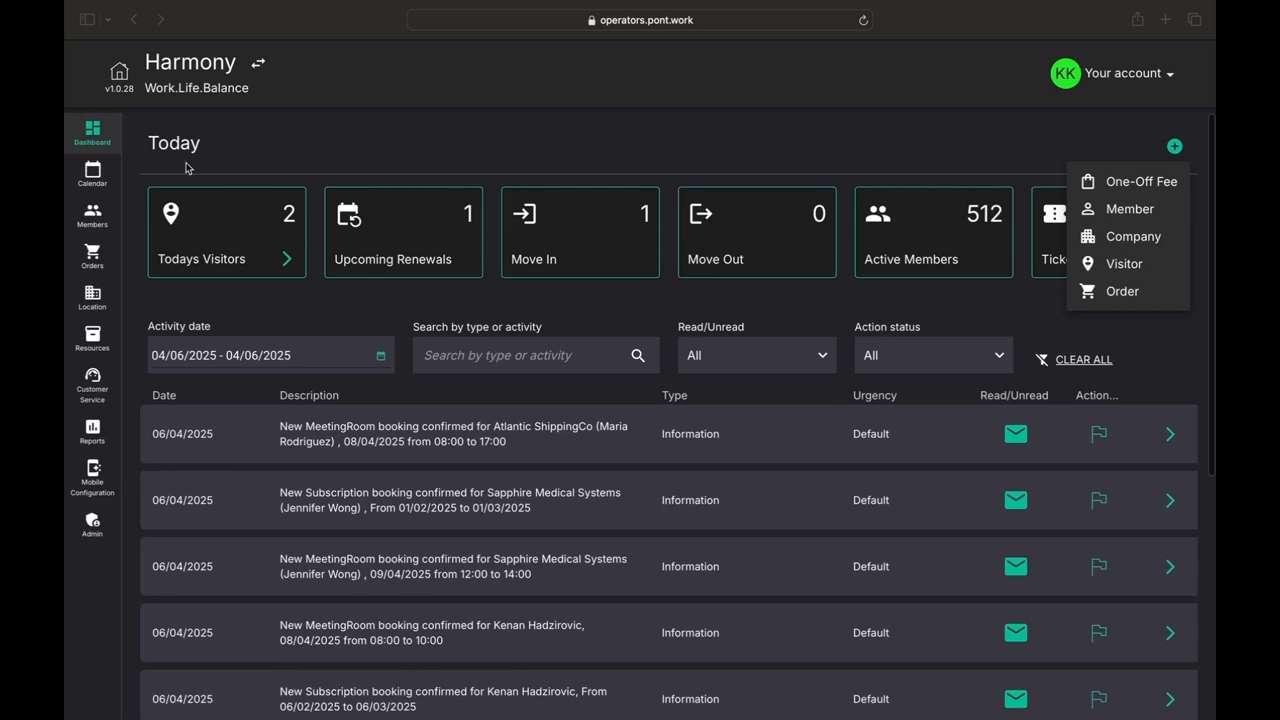
Let's explore the helpful modules on your PONT dashboard. These tools make it easy to track everything happening in your space.
Overview Modules
The dashboard shows five key pieces of information:
Visitor Tracking: See how many non-members are coming today. Click to view guest details.
Renewal Watch: Keep track of upcoming membership renewals.
Move Activity: Monitor who's moving in and out of your space.
Member Count: See your total number of active members at a glance.
Ticket System: Track open requests from members and staff about fixes or changes needed.
Smart Filtering Tools
Below the modules, you can use filters by date, search terms, or other attributes to customize what you're seeing.
Finding what you need is simple:
Pick specific dates
Search for keywords
Filter by different features
Sort information your way
Detailed Information Access
Want to learn more about something? Just click the arrow icon on the right of any item. This shows you:
Full submission details
Any missing information
Items that need follow-up
The dashboard puts all this information at your fingertips, making it easy to stay on top of your space management tasks.
Conclusion and Platform Benefits
63.2
Edit
Conclusion and Platform Benefits
The PONT dashboard makes your work life easier. Let's wrap up what makes it so special.
Why PONT Stands Out
When picking a space management platform, it's important to consider how much time your teams have to spend accomplishing simple, repetitive tasks.
The PONT platform shines because it:
Saves your team's time
Makes daily tasks simple
Lets you focus on your clients
Keeps everything organized
The Bottom Line
With PONT, you can:
Get work done faster
Stay on top of tasks
Serve clients better
Keep your space running smoothly
The quicker your team can log in, understand what's happening, and get back to helping clients, the better your space will run. PONT makes this possible with its smart, simple design.